
Stripe Reader M2
Stripe Reader M2: $179, with 12 months of Starter included
The Stripe Reader M2 costs $179 here, and the price includes 12 months of the Shoppi Starter plan ($29 a month, no limit on card payments) for the Shoppi Pay POS app. It is Stripe’s pocket Bluetooth reader for contactless, chip and swipe payments, sold in the United States, and it pairs with the app on your Android phone or tablet.
Order the Reader M2
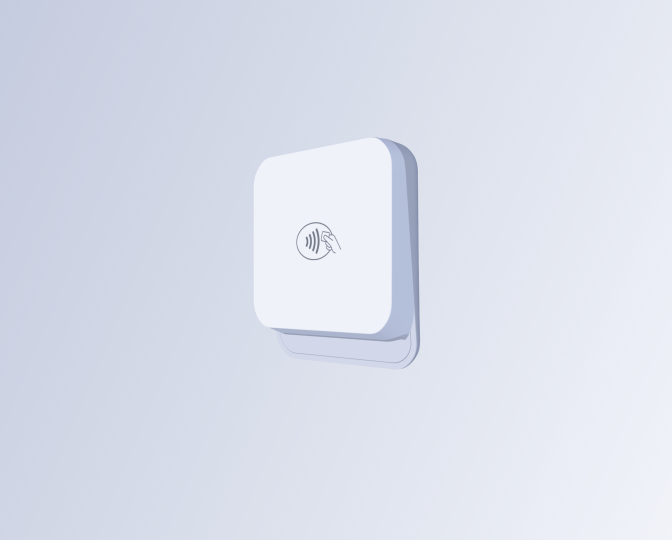
What the $179 includes
The Stripe Reader M2, new, and 12 months of the Shoppi Starter plan, which runs the Shoppi Pay POS app with no limit on card payments. The order adds no shipping charge and ships within 5 business days by standard courier.
Why it costs more than at Stripe
Stripe lists the Reader M2 at $59 on stripe.com/us/terminal for businesses that build their own app: Stripe’s documentation says the M2 isn’t supported by its standalone mode or by the Stripe Terminal app. Ours comes with a ready app and 12 months of Starter, which is $29 a month after that.
Tax and who sells it
No sales tax is added at checkout: the seller is Shoppi UG (Germany) and the reader ships as an export. Import duties and taxes, where they apply, are paid by the buyer on delivery. For businesses only; a tax ID is optional in the US.
What is in the box
Your order has three things: the reader and the cable that Stripe’s product sheet lists in the package, plus the Stripe M2 mount. The specifications below are Stripe’s.
The reader
One Stripe Reader M2, with a contactless tap area, a chip card slot and a magstripe slot.
A USB-A to USB-C cable
For charging. Stripe says to charge the reader for two hours before you use it for the first time.
The M2 mount
Stripe’s mount for the Reader M2, so the reader has a fixed place by the till.
Sources: Stripe’s M2 setup page and Stripe’s M2 product sheet, checked on 28 November 2026. Want it on the counter? The Reader M2 + Dock + Mount is $269, also with 12 months of Starter.
Setup in seven steps
From the box to the first payment. You can do steps 2 and 3 before the reader arrives.
-
Step 01
Charge it
Connect the cable from the box and charge the reader for two hours before you use it for the first time.
-
Step 02
Redeem your code
Open the e-mail with your Starter code and redeem it at shoppi.app/redeem: it creates your account and your store.
-
Step 03
Verify with Stripe
Shoppi opens your Stripe account under Stripe Connect; you enter your identity and bank details in Stripe’s form. It is the step that can take longest.
-
Step 04
Install the app
Install Shoppi Pay POS on your Android phone or tablet and sign in with the same account.
-
Step 05
Turn the reader on
Press and release the power button: the lights come on and the reader beeps twice, then it waits five minutes for a Bluetooth connection.
-
Step 06
Pair it from the app
Pair from the Shoppi Pay POS app, not from your phone’s Bluetooth settings: the app asks for Bluetooth and location permission and lists nearby readers. Pick yours.
-
Step 07
Take a test payment
Charge yourself a dollar and refund it. Then sell to somebody real.
The whole first day, with the catalog: Your first day.
How the 12 months of Starter work
12 months of Starter included: you get a code by e-mail, save a card when you redeem it, nothing is charged for 12 months, then $29 a month; you can switch to the $5 plan or cancel any time before.
A code by e-mail
After the order you get your code by e-mail, with the date by which to redeem it. Each code works once.
Redeem it at shoppi.app/redeem
Redeem the code at shoppi.app/redeem instead of the $5 signup: it creates your account and your store, or puts the Starter on a store of yours that has no paid plan yet. If your store already pays the $5 plan, write to [email protected] with your code.
12 months, nothing charged
You save a payment card with Stripe when you redeem the code. Nothing is charged for 12 months.
Then $29 a month, or less
After 12 months the plan renews at $29 a month on the card you saved. Any time before the renewal you can cancel from Manage subscription in your dashboard, or switch to the $5 plan by writing to [email protected].
Questions about the Reader M2
How much is the Stripe Reader M2?
$179 here, with 12 months of the Shoppi Starter plan included and no shipping charge on the order. Stripe lists the reader alone at $59 on stripe.com, for businesses that build their own app on its SDK.
Does the Reader M2 work with Stripe’s own apps?
Stripe’s documentation says the Stripe Reader M2 isn’t supported by standalone mode or the Stripe Terminal app, and needs an app built on its Terminal SDK. Shoppi Pay POS is such an app: the POS app for Stripe card readers.
What happens after the 12 months?
The plan renews at $29 a month on the card you saved. Any time before the renewal you can cancel, or switch to the $5 plan, which covers up to 30 card payments a month.
Is the reader mine or am I renting it?
Yours. You buy it once. If you cancel the account the reader is still your property — we do not ask for it back.
What if it breaks?
It carries the manufacturer warranty. Hardware comes back only if it is defective; then we repair or replace it under warranty. Get in touch through the help center to start.
Can I also take Tap to Pay payments?
Yes, on an Android phone or tablet with NFC, in the same app; Stripe adds $0.10 per Tap to Pay authorization. Tap to Pay does not work on iPhone.
Do you sell the Reader M2 in the UK or Ireland?
No. Stripe sells the M2 in the United States. In the UK and Ireland the Bluetooth reader is the WisePad 3: see the UK reader page or the Irish one.
Order the Reader M2 at $179.
The reader, 12 months of Starter and the app, with no shipping charge. Compare it with the T600 and Tap to Pay on the reader page.